Wednesday, January 20, 2016

Create and Share an Interactive Family History

Create and Share an Interactive Family History
 
We all have photos hanging on our walls and many in our family room. Just think how much attention you could get from your children and grandchildren if your photos could speak to them when they stand in front of the photo. Even better, the photo can make it possible (using a QR Code on the photo) to play a little movie or slideshow. (you’ve seen QR codes on packages and at the BYU Family History Library – they look like little squares full of  black dots).
 
Sound impossible, expensive, or hard? You will be amazed at how simple this is to achieve and everything you need to use is FREE! You will be taught how to do this at home on your computer.
 
You will also see and learn how to turn any calendar into a talking family history calendar.
 
Two goals for this class:
  1. Get kids and grandchildren interested in family history in a fun and interesting way. 
  2. Eliminate the need for a computer to see the video and hear the stories. All they need is a smartphone (and they or their parents will have the phone). You can also easily project audio or video stories to your TV in the same room. The device to do this is only $35 dollars at BestBuy but you only need this if you want to use your TV.
It’s OK to be skeptical – seeing is believing – so please come to the class. It’s not rocket science – you really can do this even if you are a novice computer user. There is also a webinar you can watch online that has all the steps.

Organizing Files

ORGANIZING FILES

1. The value of being organized.

 Contributes to better research and recording research results

 Allows the individual to save time in the research and recording

process

 Helps the individual find information quickly

 Provides a place to store and keep your files

 Establishes a consistent system not random and scattered

 Reduces frustration and loss of information

2. Many different ways to organizing your files

 Need to find the method that works best for you. Your system will

change over time with experience

 Should be a simple and consistent filing method

 Learn from other individuals systems and take parts that work for

you

 Use both paper and electronic files. Your system should work for

both.

3. The how and why of organizing files.

 You need to understand the different type files you want to organize

 If you use both paper and electronic, they should be set up the same

 Begin organizing what you have

 Using manila folders, 3 ring binders

 Do you have a file cabinet, portable carriers to keep physical files

 Color coding files that match pedigree and generation charts

 Organize as you go

 Stick to your system

4. Suggestions that will help with your organization

 Start with what you know about your family. Family group sheet

record for each file

 Label each file by the family name

 When a family member marries you begin a new file for that family

group

 Keep good notes (both paper and digital). Note taking should be the

same. Keep a file for your notes with each family group

 You need pedigree charts for each family group

 Keep accurate research logs for each family group. It is important to

keep good records of the research you have done, where it is kept,

and how to access it. Especially that information you may have put

on your computer. It is important to have copy in your paper files

 You will keep photo copies of source documents in each file. The

photo copies should include pictures and artifacts

 Continue adding to document files

 Your goal is to organize your files so you can find the information

again

Ancestral Quest by Michael Kennedy 2016


Pahvant Family History Conference
Ancestral Quest Syllabus

Instructor:           Michael A. Kennedy
Program Manager
FamilySearch
    IV.            Description
a.       Incline Software are the makers of Ancestral Quest and PAF.  If you are familiar with PAF then the learning curve to understand the latest features of Ancestral Quest will be easy.  Ancestral Quest is a full partner with and fully integrated with FamilySearch.  It is the easiest and most versatile genealogy program on the market.  This course will demonstrate how to integrate your family records in FamilySearch, use its capabilities to automatically update your records from FamilySearch, and simplify the process of taking your family names to the temple.  No other product allows for easier merging of duplicate records, correcting FamilySearch errors and tracking your research.
      V.            Organization
a.       This is a lecture course using a PowerPoint presentation demonstrating some of the many features of Ancestral Quest and how to collaborate with others.   The course will be interactive where you can present your real live questions and experiences.  The course is designed for beginners to advanced.
    VI.            Topics
a.       Emphasis on Ancestral Quest features:
                                                               i.      Structure and Navigation
                                                             ii.      Some of the advanced features such as merging duplicates, FamilySearch integration and how to automate updates.  How to auto check for updates on temple name submissions.  How to roll back changes.
                                                            iii.      Database check and repair
                                                           iv.      Ordinance Reservation and Tracking System
                                                             v.      Integration with Ancestry.com and other search sites.
                                                           vi.      Bookmarks and Tags
                                                          vii.      Where to check for Possible Duplicates and merge the duplicate record to your master record

FamilySearch Course by Michael Kennedy


Instructor:           Michael A. Kennedy
Program Manager
FamilySearch
        I.            Description
a.       The ultimate aim with Church family history is to “to become Saviors on Mt. Zion.  We know that one of the primary tasks to achieve this is performing the saving ordinances we have received and enabling those who are deceased to have those same blessings especially those of our own family.  This course will help you to understand how to generate and print out your own temple cards.  In addition, how to check that the ordinance work has not been previously performed and removing duplicate records.
      II.            Organization
a.       This is a lecture course using a PowerPoint presentation demonstrating the process, tips, and what to watch out for.  The course will be interactive where you can present your real live questions and experiences.  The course is designed for beginners.
    III.            Topics
a.       How to navigate FamilySearch Ordinances and understand what you are seeing
b.      Where to check for Possible Duplicates and merge the duplicate record to your master record
c.       Understand where you find your reserved names and work within the reservation system from reserving names to printing temple cards.  I’ll demonstrate how to assign temple work to others (family members or the Church temple system).


Making Family History Cards and Calendars by Marlo Schuldt


Greeting cards and personalized calendars are a great way to teach and share family history with everyone – relatives, kids and grandkids. You can make very simple cards and calendars. I know you can do this because I have a 6 year old grandson that loves to make cards to send to his grandma. In fact many of my grandkids make and send cards to us. It’s another way to bond with and teach your grandchildren about the truly important things in life – family relationships, heritage, and how gospel experiences have made a difference in your life.
 
There are several times a year when you can make cards to send and to put some old photos that teach or get them asking questions about who the people are that provides and opportunity for you to start teaching them about their heritage with a smile on your face!
 
Please come to the class if it’s only to get some ideas of the fun and powerful things you can do making calendars and cards!

Find My Past by Karolyn Warnich

FindMyPast has become one of the pre-eminent websites for anyone doing British research. In particular, they have over 1 billion records from the British Isles. Over 1,000 of all their collections can be found only on FindMyPast and most of these are likely British.

The largest collection of records for FindMyPast are in the UK and Ireland collections. In 2012, FindMyPast moved into the US and Canadian market, becoming a partner is the digitization and indexing of the 1940 census. According to their website, they have 18 million registered users and 1.8 billion records. Their model is to actively partner with libraries and archives including FamilySearch, the British Library, the New England Historic Genealogical Society, the National Archives (UK) and Eneclann among others.

Findmypast is home to a massive collection of newspapers, especially from England Ireland. Our partnership with the British Newspaper Archive (https://www.britishnewspaperarchive.co.uk/) has added more than 11 million pages of newspaper images to the Findmypast site, and the goal is to digitize up to 40 million pages from the vast collection at the British Library. For most of these papers, this is the first time they have been made available online.

Michael Kennedy


Mike joined the church at age 18 and is the first of Joseph and Emma’s descendants to hold the Melchizedek Priesthood in the offices of Elder, Seventy and High Priest.  He is the first descendant of the Prophets family to receive his endowments.

He is the President and Executive Director of the Joseph Smith Jr. Family Organization and the Joseph Smith Jr and Emma Hale Smith Historical Society created 1985 & 2006 respectively.   He was the Executive Producer of the movie released in theaters throughout the country, “Emma Smith, My Story.  In addition, he has produced the following films:  “The Times and Teachings of the Prophet Joseph Smith,  “Children of Joseph” and “Discovering Emma.”  Mike works in the Information Technology field and is a graduate of BYU.  He currently works with FamilySearch helping with the development of their technology and formerly the CTO of Propay (an online credit card processing and merchant service company), he has served 4 years as President of the Salt Lake City Chapter of InfraGard, which collaborates with the FBI in increasing the security of the United States critical infrastructures.

 He and his wife Darcy live in Alpine and have been married for over 42 years and have 6 children and 19 grandchildren. Darcy was born and raised in Nevada and works in the medical field. The missionaries found her at the age of 17 and became the only member of her family to join the church at that time.  She servers on the board of the Joseph Smith Jr. and Emma Hale Smith Historical Society.  She has co-authored the book “The Emma Smith We Know” and she calls her moment in the movie “Emma Smith My Story” her “fifteen seconds of fame.”

Marlo Schuldt

Marlo is the President of LifeStory Productions, Inc., an Orem, Utah based company that develops family history software and provides assistance to individuals desiring to gather, prepare, print, and share family history. With a BS and MS degrees from Brigham Young University, he recently patented the Heritage Collector Software. Father of five; grandfather of 13 including twin grandsons (grandkids are our reward for being parents). I’ve been working for 15 long years trying to figure out how to interest our children and grandchildren in family history – finally just figured it out and have just created a set of classes designed to teach our grandchildren how to get started in family history.

Monday, August 31, 2015

2015 Pahvant Valley Family History Conference

Theme: Shall we not go on in so great a cause?

Register using the form at the bottom of this post.

Saturday, September 26, 2015. 8:00 A.M. to 4:00 P.M.
Millard High School - 200 West Center Street, Fillmore, Utah (map)


Pricing
$7.50 for printed, bound syllabus with all handouts.
$6.00 for lunch at the stake center (across from Millard High).


Schedule
8:00 - 8:45      Registration - Main Hallway
8:45 - 10:15    Keynote Speaker Ron Tanner - Auditorium (bio)
10:30 - 11:30  Breakout Session 1
11:30 - 11:45  Break
11:45 - 12:45  Breakout Session 2
12:45 - 1:45    Lunch and Drawings - Stake Center Cultural Hall
1:45 - 2:45      Breakout Session 3
2:45 - 3:00      Break
3:00 - 4:00      Breakout Session 4


Sessions (subject to change)


Breakout Session 1
Band Room: How to Solve Family Tree Problems. Instructor: Ron Tanner. (bio) (description)
Home Ec. Room: Turning Hearts with Priesthood Leadership. Instructors: Fillmore, Utah Stake Presidency.
Turner's Room: Family Stories with the Whole Family. Instructor: Marlo Schultz. (bio) (description)
Computer Room: Family Tree Basics part 1. Instructor: Allyson Wood. (description and handouts for all four parts)

Breakout Session 2
Band Room: RootsMagic 7. Instructor: Renee Zamora. (bio) (description) (handout)
Home Ec. Room: Sleuthing Records. Instructor: Lisa Ratzlaff.
Turner's Room: Using FamilySearch and Ancestry.com. Instructor: Sandra Jarvis. (bio) (description) (handout)
Computer Room: Family Tree Basics part 2. Instructor: Allyson Wood.
Science Room: Tips for Setting up a Youth Program. Instructors: Melissa Robison and Sylvia Wall.

Breakout Session 3
Band Room: Legacy Family Tree. Instructor: Leonard Plaizier. (bio) (description) (handout)
Home Ec. Room: Elbow Relations. Instructor: Lisa Ratzlaff.
Turner's Room: US Census - Techniques and Strategies to Find Family. Instructor: Holly Hansen.
Computer Room: Family Tree Basics part 3. Instructor: Allyson Wood.

Breakout Session 4
Band Room: The Family History Guide.
Home Ec. Room: Military Records. Instructor: Lisa Ratzlaff.
Turner's Room: Using FamilySearch and Find My Past. Instructor: Sandra Jarvis. (bio) (description) (handout)
Computer Room: Family Tree Basics part 4. Instructor: Allyson Wood.


For more information, contact Tafta Watson: 435-743-5787, box423@gmail.com


Thursday, August 13, 2015

Syllabus for the 2016 Conference


FamilySearch Family Tree Syllabus  by Allyson Wood, includes notes for all of her classes.

Conference held Sep 26th in Fillmore

Please mark your calendars! We are pleased to announce that the 6th annual Pahvant Valley Family History Conference will be at Fillmore, Utah. It will be held at Millard High School.

This year we have a wonderful keynote speaker. He is Ron Tanner, Product Manager of FamilySearch. If you have heard Brother Tanner speak, you know he is knowledgeable, articulate, and very entertaining. He has sometimes been called the FamilySearch Comedian.

We are having wonderful classes for beginners to more advanced genealogists and family historians. There will also be a strand of classes for our youth with classes specifically for them. We are trying to have a special activity for the youth the last hour of the conference. Details will come soon.

We will also have a class to help youth leaders.  We will share what we have done, give suggestions on how you can help the youth in your ward and stake have the blessings and fun of participating in family history work.

There will be classes for everyone so mark your calendar and plan on attending.

Friday, September 19, 2014

Family History Conference

The 2015 Pahvant Valley Family History Conference will be held in Fillmore this year on Sep 26.  Please plan on meeting us there.  It should be another great conference.

Thursday, July 17, 2014

2014 Conference: Connect Your Cousins Past, Present and Future

Attend The Pahvant Family History Conference and learn how to strengthen your family across generations. Hear encouraging messages from experts in the industry and other speakers who will help inspire you to:

  • Seek out your ancestors 
  • Build your family tree
  • Discover and share your families’ stories
  • Research Strategies and help


Schedule
  7:45 –  8:30 Registration in the commons area
  8:30 –  8:45 Opening Session - auditorium
  8:45 –  9:45 Keynote Speaker TC Christensen            
 9:45 – 10:10 Visit Vendor Booths - commons area
10:10 - 11:10 1st Session
11:10 – 11:30 Visit Vendor Booths
11:30 –  12:30 2nd Session
12:30 –  1:30 Lunch and visit Vendor Booths in the commons area
                      Demonstration - Heritage Collectors in the Library, Rm #104
  1:30 –  1:45 Drawings
  1:50 –  2:50  3rd Session
  2:55 –  3:15 Visit Vendor Booths
  3:15 –   4:15 4th Session


Session 1
Family Tree #1  By Allyson Wood  Computer Lab Rm #103   Users Guide  Clean and Source
Family History Made Easy (temple) by Paul Larsen
Deductive Reasoning and Logic By Hollie Hansen Ed Net Rm #105
Canadian Research By Veniece Lovell
Legacy (Organizing, Planning and Sharing) By Leonard Plaizier Rm#109 
Get to Know Your Geezers By Matthew Hovorka Rm #114

Session 2
Family Tree #2 By Allyson Wood Computer Lab Rm #103 Users Guide  Document Tracker: pdf 
Danish Research By Joan Fin & Hans Lovell Library Rm #104
Organizing Files/Quick Attach Sourcing Tool By Jodi Nielsen Ed Net Rm #105  Handouts
Ancestral Quest By Gaylon Findlay Rm #107 
Grandpa’s on My IPad (Social Media) By Janet Hovorka Rm#109
Beginning Research By Julie Hammons  Rm #114

Session 3
Adding Photos and Stories to Family Tree By Beth Ann Wiseman Computer Lab Rm #103
Fly Me to the Farm (Homestead Records) By Marlo Schuldt Library Rm #104
Roots Magic By Renae and Zamora  Ed Net Rm #105
What's Your Story? By Tafta Watson  Getting Started Ideas  52 questions  #107
Zap the Grandma Gap by Janet Hovarka Rm#109
English Research By Julie Hammons Rm #114

Session 4
Ancestry.com By Vivian Rowlette  Computer Lab Rm #103
Scanning By Marlo Schuldt Library Rm #104
Roots Magic and Family Tree By Renae and Diana Zamora  Ed Net Rm #105  ?New
Legacy and Family Tree By Leonard Plaizier  #107
Ancestral Quest and Family Tree By Gaylon Findlay  #109
New England Research By Julie Hammons  Rm #114

Google Cheat Sheet
Timeline
Record Selection Table
Desktop Programs With FamilySearch Family Tree
Document Tracker (research log and form for all kinds of documents for one person) Doc WP
FS FT Clean and Source   Doc  WP

Class Descriptions:
Class Presenter Bios:


Saturday, October 12, 2013

5th Annual PVFH Conference CONNECTING WITH COUSINS

......Let us help you make some connections .....
Our annual conference will be held Sep 27, 2014 in Delta, Utah at the new high school.
It is an all day event from 8:30-4:30.  Please mark your calendars now to be
sure you will be able to attend.

You will want to plan now to spend the whole day, as this years "bigger and better" conference will have 24 classes offered.

This years Keynote Speaker will be Tom C. Christensen grew up in a family of 10 children in Layton, Utah. After serving an LDS mission in parts of Ohio and West Virginia
he studied filmmaking at Brigham Young University and the University of Utah. He and his wife Katy have two children. They make their home Centerville, Utah.

His films range from The Mouths of Babes in 1979 to Ephraim's Rescue in 2013. As an American filmmaker T.C. is best known for films about Latter-day Saint pioneers. Among
these are Joseph Smith: The Prophet of the Restoration and Emma Smith: My Story, Only A Stonecutter and the John Tanner Story.

On such films as the first Work and the Glory, Christensen's cinematography was considered by some to be by far the best part of the film. In the summer of 2011, 17 Miracles was released across the country. The film depicts the Willie and Martin handcart companies and their struggles and witnessed miracles as they traveled across the plains to Salt Lake City in 1856 and set new expectations for LDS genre theatrical films.

He has won more than 270 national and international awards for his work in writing, editing, directing and producing movies and in 2010 was invited to join the very prestigious, American Society of Cinematographers.

For Christensen, it’s all about telling stories that will make a difference in people’s lives. T.C.’s films deal with ideas and stories that tap into inner feelings and thus the spiritual dimension,” Keith Merrill a mentor and fellow filmmaker, said. “When the spirit touches your heart in the middle of a movie, as so often happens in a T.C. Christensen film, there is no question hearts are touched, lives are adjusted and they make a difference.”


Monday, September 9, 2013

Schedule

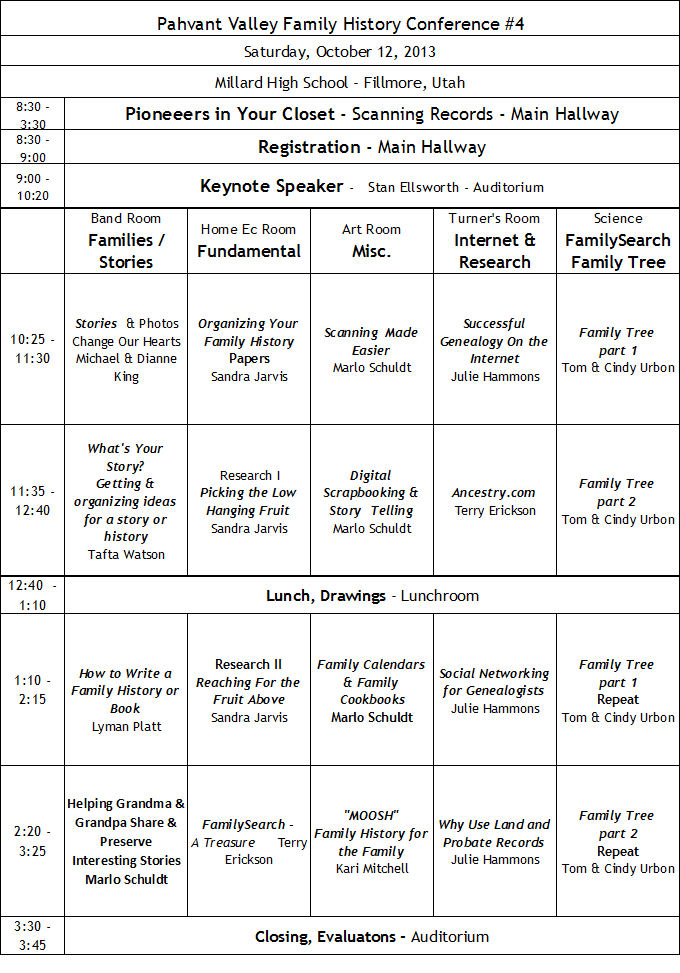
Pahvant Valley Family History Conference #4
Saturday, October 12, 2013
Millard High School - Fillmore, Utah

8:30 - 3:30:  Pioneers in Your Closet - Scanning Records - Mail Hallway
8:30 - 9:00:  Registration  - Main Hallway
9:00 - 10:20:  Keynote Speaker - Stan Ellsworth - Auditorium

10:25 - 11:30:
......................  Stories and Photos - Change Our Hearts (?) - Michael and Dianne King  (Band)
......................  Organizing Your Family History Papers (?) - Sandra Jarvis (Home Ec)
.....................   Scanning Made Easier  (?) - Marlo Schuldt  (Art)
.....................   Successful Genealogy on the Internet (?) - Julie Hammons (Turner)
11:35 - 12:40:
.....................   What's Your Story?  Getting and Organizing ideas for a story or history(?) 52 Questions  Tafta Waton  (Band)
.....................   Research 1: Picking the Low Hanging Fruit (?) - Sandra Jarvis (Home Ec)
.....................   Digital Scrapbooking and Story Telling (?) - Marlo Schuldt (Art)
.....................   Ancestry.com  (FHC Edition) (?)  - Terry Erickson (Turner)
....................    Family Tree, Part 2 (?) - Tom and Cindy Urbon (Science) ( Photos, Stories, and Temple Ordinances)  

12:40 - 1:10:    Lunch and Drawings in the lunchroom

  1:10 - 2:15:
.....................   Elbow Relations (2)  (?) Lisa Ratzlaff  (Band)
....................    Research II, Researching for the Fruit Above (?) - Sandra Jarvis (Home Ec)
....................    Family Calendars and Family Cookbooks (?) - Marlo Schuldt (Art)
....................    Social Networking for Genealogists (?) - Julie Hammons (Turner)
....................    Family Tree, Part 1 (repeated class) (?) - Tom and Cindy Urbon (Science) (Science) (Introduction,  IndividualsRelationships, SourcesHelps and Resoures.  Research Log PDF)
....................    FamilySearch - A Treasure (?) - Terry Erickson (Home Ec)
....................    Moosh - Family History for the Family (?) - Kari Mitchell (Art)
....................    Why Use Land and Probate Records (?) - Julie Hammons (Turner)
....................    Family Tree, Part 2 (repeated class) (?) - Tom and Cindy Urbon (Science)  ( Photos, Stories, and Temple Ordinances)  

   3:30 - 3:45    Closing Evaluations - Auditorium